Invoice Tracker: How to Track Paid and Unpaid Invoices
Struggling to get paid on time? Learn how to build a simple invoice tracker in Google Sheets or Excel to manage your cash flow and stay organized.
Published · Updated · By ToolNimbly
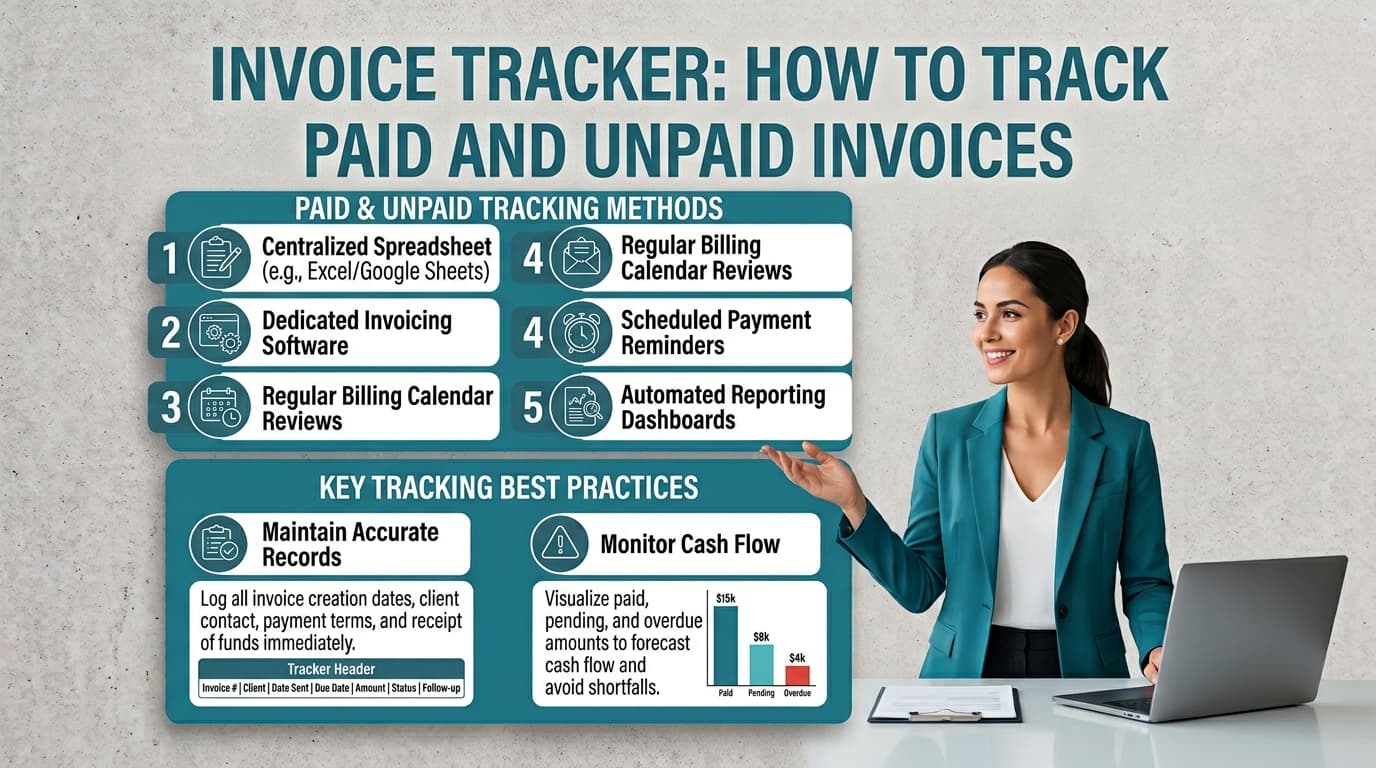
The time between delivering a project and receiving payment is known as the invoicing gap. For many small business owners, this gap is a primary source of cash flow instability. Without a clear system to monitor who has paid and who is falling behind, you risk losing track of revenue.
You do not need complex enterprise software to bridge this gap. A well-maintained invoice tracker provides the visibility necessary to manage your receivables, maintain professional relationships with clients, and ensure you have the records required for your business operations.
Why You Need an Invoice Tracker
At its core, invoice tracking is about organization. When you send an invoice, you are initiating a request for payment. Failing to monitor that request often results in late payments or forgotten balances.
Maintaining Cash Flow Visibility
A manual tracker gives you an immediate snapshot of your business health. By recording every invoice issued, you can see exactly how much cash is expected to arrive and when. This visibility allows you to make informed decisions about business expenses, payroll, or reinvestment.
Professionalism and Client Relationships
Consistent tracking prevents the awkwardness of chasing payments that have already been made or, conversely, failing to follow up on a long-overdue invoice. When you approach a client about an unpaid balance with accurate data in hand, you demonstrate that you are organized and serious about your business operations.
Maintaining Business Records
Keeping organized records is a standard practice for tracking income and business performance. While specific record-keeping requirements vary by jurisdiction and industry, maintaining accurate, complete, and retrievable records of your sales invoices, receipts, and payment processor records is a practical way to manage your business. If you have questions about specific retention periods or documentation standards for your business, consult with a certified public accountant or relevant tax authority.
Building Your Simple Invoice Tracking Template
You can build a robust tracking system using basic spreadsheet software like Google Sheets or Excel. The goal is to create a single source of truth for your income.
Setting Up Your Columns
Open a new sheet and create the following headers in the first row. These columns capture the essential lifecycle of an invoice:
Invoice Number: Use a unique identifier, such as INV-1001, to keep your records organized and easy to reference during communication with clients.
Client: The name of the person or company you are billing.
Issue Date: The date the invoice was sent.
Due Date: The specific deadline for payment.
Amount: The total dollar value of the invoice.
Payment Status: A dropdown menu is ideal here. Use categories like Unpaid, Paid, Overdue, and Disputed.
Notes/Next Action: Use this space to record details, such as "Followed up on 10/12" or "Client requested split payment."
If you need to generate a professional document before you log it, you can use a free invoice generator to create, format, preview, print, or download an invoice as a PDF. This tool allows you to input business and client details, line items, and payment instructions to ensure your request for payment is clear and itemized.
Automating with Conditional Formatting
Spreadsheets offer powerful tools to help you stay ahead of deadlines. Use conditional formatting to highlight cells automatically. For instance, you can set a rule so that if the payment status is Unpaid and the due date is in the past, the entire row turns red. This visual cue acts as a daily reminder of which clients require a follow-up.
Best Practices for Managing Your Receivables
A system is only as good as the habits supporting it. To keep your invoice tracker effective, you must standardize your workflow.
Standardize Your Descriptions
Vague invoices are a common cause of payment disputes. Always provide a clear, concise description of the services rendered or goods provided. When a client understands exactly what they are paying for, they are more likely to process the invoice promptly.
Invoice Immediately
Delayed invoicing is one of the most frequent causes of late payments. Send your invoice as soon as the project is complete or the milestone is reached. The longer you wait to send the bill, the more likely the client is to deprioritize your payment.
Managing Disputed vs. Unpaid
Treating a disputed invoice as simply unpaid is a mistake. If a client disputes an invoice, change the status to Disputed and use the notes column to document the specific issue. This distinction is vital because a disputed invoice requires a different resolution strategy, such as providing additional documentation or clarifying terms, than an invoice that is simply sitting in a client's inbox.
When to Transition from Spreadsheets to Accounting Software
While a spreadsheet is a perfect foundation for a small business, it is not a permanent accounting solution. You will eventually reach a point where manual entry becomes a bottleneck.
Recognizing the Limits of Manual Tracking
You should consider transitioning to dedicated accounting software when:
Volume Increases: You are spending more than an hour or two each week manually updating your tracker.
Complexity Grows: You need to track inventory, manage complex sales tax across multiple jurisdictions, or perform bank reconciliation.
Need for Automation: You require features like automated recurring invoices, late payment reminders, or direct bank feeds that sync with your transactions.
Remember that a spreadsheet is a tool for tracking, not a full-scale accounting system. As your business grows, the time saved by automating these administrative tasks will often outweigh the cost of a subscription.
Frequently Asked Questions
How long should I keep my invoice records?
Retention requirements vary based on your location and industry. While some general business practices suggest keeping records for several years, you should consult with a tax professional or your local tax authority to determine the specific requirements for your business. Ensure you have a reliable backup system for your digital files to prevent data loss.
What should I do if a client pays late?
Maintain a professional and documented follow-up process. If an invoice passes its due date, send a polite reminder. If the client remains unresponsive, escalate your communication while keeping a record of every interaction in your tracker. Always update your next action column so you know exactly when you last contacted them and when you intend to reach out again.
Are digital copies of invoices acceptable?
Yes, digital copies are a standard way to maintain business records. Ensure your files are accurate, complete, and stored in a way that allows you to retrieve them when needed. Using a consistent naming convention for your files, such as "YYYY-MM-DD_InvoiceNumber_ClientName," can help you stay organized.
How do I handle sales tax on my invoices?
Sales tax treatment and display requirements vary significantly depending on your location and the nature of your business. Because tax laws are highly localized, you should check with your local tax authority or a qualified accountant to understand how to calculate, collect, and display tax on your invoices. Do not assume that a standard invoice template covers all regional tax requirements.
What should I include in my payment instructions?
Include clear, professional instructions on how the client can remit payment. This might include approved bank transfer instructions, a link to a payment portal, or instructions for mailing a check. Exchange sensitive account or onboarding information through an appropriate secure channel. If you use a third-party payment processor, follow its security guidance when sharing payment links or instructions.
Can I use a spreadsheet for all my business accounting?
A spreadsheet is an excellent tool for tracking the status of your invoices and managing your receivables. However, it does not perform the functions of a full accounting system, such as automated bank reconciliation, complex tax reporting, or inventory management. As your business grows, you may find that the manual effort required to maintain a spreadsheet becomes inefficient, at which point you should evaluate dedicated accounting software.
Put this into practice
Use the Invoice tool for the calculation, then read What an invoice needs to contain for the supporting explanation.