What Does an Invoice Look Like? Parts and Example
Wondering what does an invoice look like? Learn the essential parts of a professional invoice, see a clear example, and create your own with our free tool.
Published · Updated · By ToolNimbly
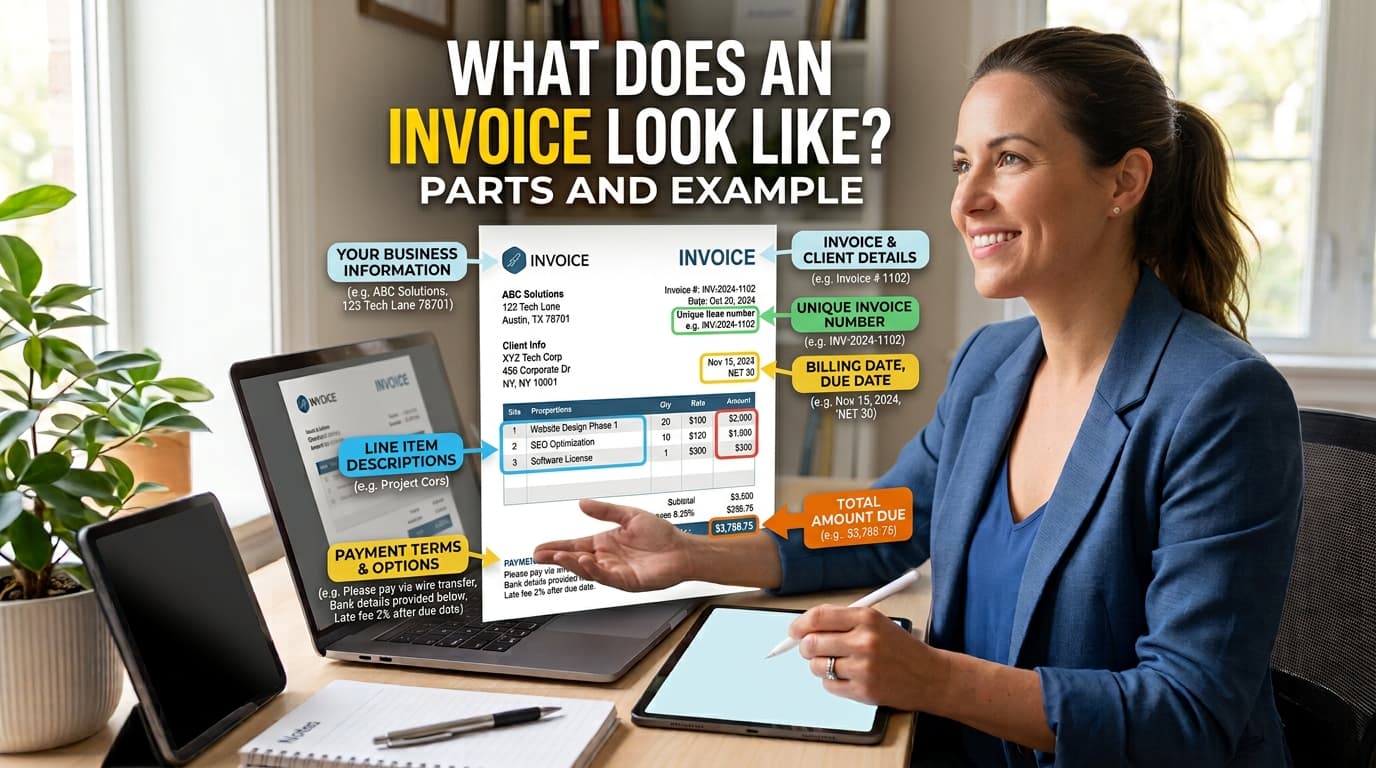
When you run a business, an invoice serves as a request for payment and a record of a transaction. Maintaining clear records of income and expenses is a standard practice for business bookkeeping, and the IRS notes that invoices are among the supporting documents that can contain information used in business books and tax records.
If you have wondered what does an invoice look like, you are likely looking to refine your billing process to communicate clearly with your clients. Professional documents follow a predictable structure that helps both you and your client understand the details of the transaction, the payment deadline, and the steps to settle the balance.
The Anatomy of a Professional Invoice
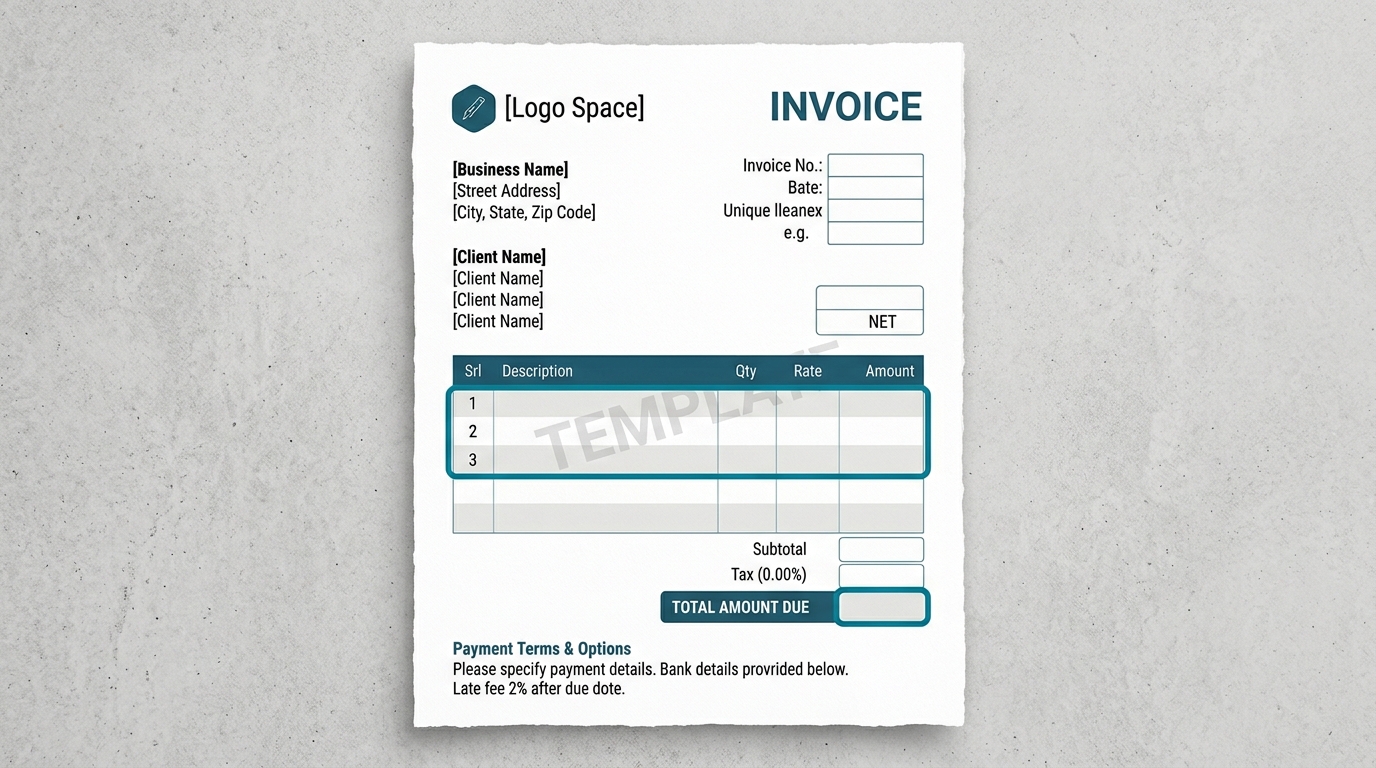
A well-structured invoice is designed for readability. When a client opens your document, they should be able to identify the core details quickly. While specific requirements can vary by industry, transaction, and tax status, many invoices include the following components.
1. Header Information
The top of your document often identifies the sender. This includes your business name, address, and contact information. If you have a logo, placing it at the top helps establish your brand identity.
2. Recipient Details
Below your information, you might list the client’s details. This includes the name of the person or company you are billing and their billing address. This helps ensure the document is directed to the correct party.
3. Transaction Identifiers
Many businesses use a unique invoice number. This is useful for your internal tracking, as it allows you to reference specific transactions during client communication. Alongside the number, you might include the date of issue and the payment due date.
4. Itemization of Services or Goods
This is a central part of the document. Each product or service can be listed on its own line. Including a brief description, the quantity provided, and the rate per unit helps provide clarity regarding the services rendered.
5. Financial Summary
After the itemized list, providing a clear calculation of the costs is helpful. This section can show the subtotal, any applicable taxes, shipping fees, or discounts. Finally, displaying the total amount due provides a clear summary. If you have already received a partial payment, you might also show the paid amount and the remaining balance due.
6. Payment Instructions
Clearly stating your accepted payment methods and providing the necessary details for each is a practical step. If you have specific terms, such as Net 30 or due upon receipt, including them clearly in this section helps set expectations.
Example Invoice Layout
To visualize these components, consider a standard, clean layout. A professional invoice is typically divided into logical segments:
Top Left: Your business name, logo, and contact info.
Top Right: The word INVOICE, followed by the unique invoice number, issue date, and due date.
Middle Left: A Bill To section containing the client’s name and address.
Center: A table with columns for description, quantity, rate, and amount.
Bottom Right: A summary block showing the subtotal, discounts, taxes, fees, and the final total amount due.
Footer: A brief thank you note and payment instructions.
This layout is effective because it follows a natural reading pattern. By grouping related information, such as all financial data in one area and all contact data in another, you minimize the effort required for the client to process the document. Remember that your specific needs may vary based on your industry or the nature of the project.
How to Create Your Own Invoice
Consistency is a hallmark of a professional business. Every time you send an invoice that shares a similar structure and style, you reinforce your brand’s reliability. Using a standardized template is an efficient way to ensure you include all necessary information.
If you are ready to formalize your billing process, you can use our tool to make a professional invoice. This generator allows you to input your business and client details, itemize your services, and calculate totals with precision. Because the tool uses exact decimal arithmetic and runs locally in your browser, you can create, format, preview, print, or download an invoice as a PDF.
The generator supports features such as adding a logo, adjusting line items, and including discounts, taxes, or fees. It offers at least two visual templates to suit your brand. Because the tool does not store your data on a server, your information remains private, and you are responsible for saving your own files. Once your invoice is generated, keep a copy in your digital or physical records. Consistent recordkeeping is a practical way to monitor your cash flow.
Best Practices for Invoice Management
Beyond the visual layout, how you manage your invoices internally is just as important as how they look. Consider these steps to maintain an organized billing workflow.
Establish a Consistent Numbering System
Since the invoice generator does not maintain an automatic numbering sequence, you should establish a system that works for your business. Many businesses use a simple chronological sequence or a system that incorporates dates. Whatever system you choose, ensure it is unique for every document to avoid confusion during your bookkeeping process.
Maintain Organized Records
The IRS states that businesses may choose a recordkeeping system suited to the business that clearly shows income and expenses. Whether you prefer digital folders or physical filing cabinets, keep your invoices organized by date or by client. This makes it significantly easier to track which payments have been received and which are still outstanding.
Communicate Clearly with Clients
If a client has questions about an invoice, respond promptly. Clear communication regarding the services provided and the payment terms can help maintain a positive professional relationship. If you offer multiple payment methods, ensure the instructions on the invoice are accurate and easy to follow.
Review Your Invoices Before Sending
Before you print or download your PDF, take a moment to review the document for accuracy. Check that the itemized list matches the work performed, the math is correct, and the contact information is up to date. A quick proofread can prevent errors that might delay your payment.
Frequently Asked Questions
Is there a specific format for invoices in the US?
There is no single, universal template. The IRS emphasizes that you must maintain a recordkeeping system that clearly shows your income and expenses, and invoices are one way to document these figures. Always consult with a tax professional if you are unsure about industry-specific requirements for your business. You can find more information on recordkeeping at irs.gov.
What is the most important part of an invoice?
Clarity is a key aspect. If a client cannot quickly determine the total amount due, the payment deadline, or how to send the funds, the invoice is not functioning correctly. Ensure your total amount, due date, and payment instructions are prominent and easy to read.
Does the invoice generator handle automatic numbering?
No. The tool does not maintain an automatic numbering sequence or a server-side client database. You will need to manage your own invoice numbering system to ensure each document remains unique for your bookkeeping purposes.
Can I store my invoice history in the tool?
No. The tool does not store your data on a server. It does not provide cloud history or cross-device access. You are responsible for saving your own files locally after you create, format, preview, print, or download an invoice as a PDF.
Does the tool provide tax or legal advice?
No. The tool is designed to help you create a document for your business records. It does not provide accounting, tax, or legal advice. Because requirements vary by jurisdiction, industry, and tax status, you should consult with a professional regarding your specific business needs.
How should I handle taxes on my invoice?
Tax treatment and display requirements vary by jurisdiction and industry. Because these rules can be complex, you should check with the relevant tax authority or a professional adviser to determine how to correctly calculate and display taxes on your invoices.
What should I include in my payment instructions?
Include clear, accurate details for your preferred payment methods. Ensure that the information is easy to read so that your client knows exactly how to settle the balance. Exchange sensitive account or onboarding information through an appropriate secure channel rather than adding it to a routine invoice.
How do I keep my invoices organized?
You can organize your invoices by date, by client, or by status (such as paid or unpaid). Using a consistent naming convention for your saved PDF files can also help you locate specific documents quickly when you need to reference them for your bookkeeping.
Can I add a logo to my invoice?
Yes. The tool allows you to add a logo to your invoice. The logo is processed locally in your browser and is not uploaded to a server, ensuring your brand assets remain private.
What happens if I make a mistake on an invoice?
If you notice an error after sending an invoice, it is best to communicate with your client immediately. You may need to issue a corrected invoice or a credit memo to adjust the balance. Maintaining clear communication helps resolve these issues professionally.
How do I ensure my invoice is professional?
A professional invoice is clean, easy to read, and contains all the necessary information for the client to process the payment. Using a consistent layout, proofreading for accuracy, and providing clear payment instructions are all ways to ensure your billing documents reflect the quality of your business.
Put this into practice
Use the Invoice tool for the calculation, then read What an invoice needs to contain for the supporting explanation.